


概要
- Optiboot(UNO)ブートローダ付き SMD ATmega328P マイクロコントローラ
- 14個のデジタルI / Oピン(6個のPWM出力)/ 6個のアナログ入力
- ISP 6ピンヘッダ、32KBフラッシュメモリ、16MHzクロック速度
- プログラム可能なインジケータLED、プッシュボタン、および セレクタスイッチ付き ピエゾブザー
- Arduino R3シールド対応
Cytron Maker UNO マイクロコントローラは、コーディングとマイクロコントローラを学ぶ学生向けに、特別に設計 および 開発されたArduino UNO互換ボードです。この素晴らしいボードを使い始めることで、誰もがメーカーになることを奨励するために、Maker UNOという名前が付けられています。プログラムすることが当然可能な、シンプルなオーディオ出力として機能するピエゾブザーを備えています。さらに、Arduino UNOの互換性を保証するために、このピエゾブザーを無効にしてI / Oをそのまま残すスライドスイッチもあります。
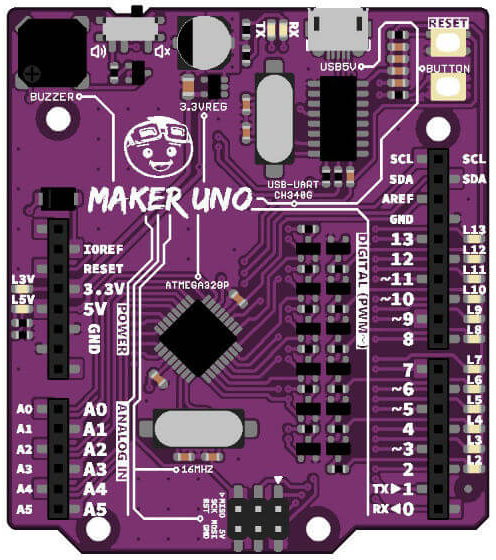
Maker-UNOには、ピン13の標準LEDとは別に、ピンD0からD13までの各デジタルピンにプログラム可能なLEDが付属しています。十分なLEDの数に、きっとご満足いただけるはずです。Maker-UNOボードだけでデジタル入力、出力、PWM(ピエゾブザー、LED輝度)を学ぶことができます。 FTDIチップを、低価格で安定したUSB~UART間のICであるCH340 ICに変更する必要があることにご注意ください。
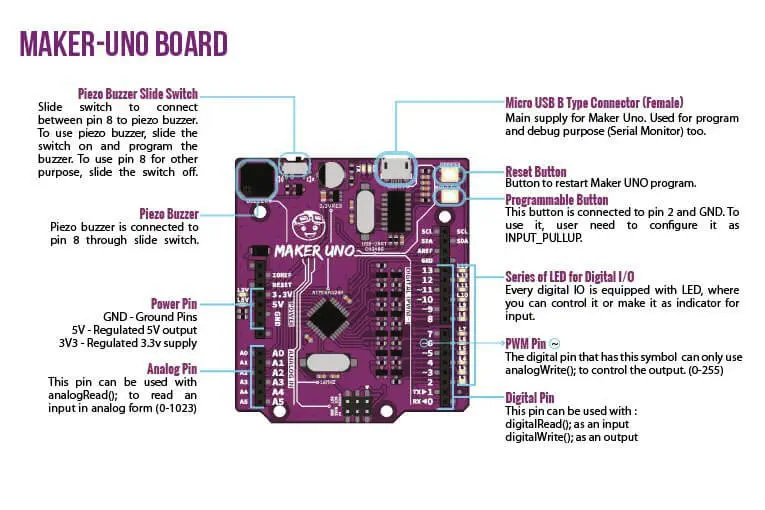
Maker-UNOは、UNO Optibootブートローダ(プログラムをより速くロードする)のシンプルさ、CH340の安定感 および 最新のArduino UNO R3のR3シールドの互換性を兼ね備えています。
- 1 × Cytron Maker UNO マイクロコントローラ
- Optiboot(UNO)ブートローダを搭載したSMD ATmega328Pマイクロコントローラ(Arduino UNOと同じマイクロコントローラ)
- CH340により簡単なUSBプログラミング
- 入力電圧:コンピュータ、電源バンク または 標準USBアダプタからのUSB 5V
- 500mA(最大)3.3V電圧レギュレータ
- 3.3V互換入力を備えた0〜5V出力
- 14個のデジタルI / Oピン(6個のPWM出力)
- 6個のアナログ入力
- ISP 6ピンヘッダ
- 32KBフラッシュメモリ
- 16MHzのクロック速度
- R3シールド対応
- 5V、3.3V、TX、RX および すべてのデジタルピン用のLEDアレイ
- USB Micro-Bソケットを活用
- 紫色のPCB!