Description
- DFRobot I2C/TWI LCD1602 Module
- Features clear 16x2 LCD with blue backlight
- Utilizes I2C for simple wiring in Arduino
- Provides adjustable contrast for clarity
- Offers configurable I2C address to prevent conflicts
- Includes breadboard-friendly XH2.54 connectors
The DFRobot I2C/TWI LCD1602 Module is a 16x2 character LCD display designed for use with Arduino projects. It features a blue background with white characters, offering a clear and visually appealing display. This module is particularly advantageous for projects where pin availability is limited, such as those using the Arduino Uno, as it employs an I2C communication interface. This interface requires only four pins for connection, namely VCC, GND, SDA, and SCL, thereby simplifying the wiring and reducing the complexity of connections.
The module is equipped with standard XH2.54 connectors, which are compatible with breadboards and allow for straightforward connections using jumper wires. This feature enhances the ease of installation and provides flexibility in project design. The I2C address of the module is configurable within the range of 0x20 to 0x27, allowing users to avoid address conflicts with other I2C devices such as ultrasonic sensors and accelerometers. Additionally, the contrast of the display can be manually adjusted using a potentiometer, enabling optimization of the display's visibility according to environmental conditions and personal preferences.
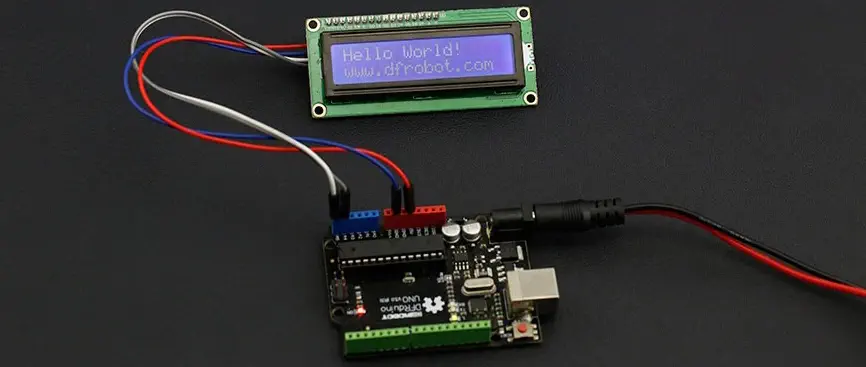
For projects requiring more display space, an alternative option is available in the form of a 20x4 character LCD display module, which offers a larger display area. This alternative can accommodate more characters, providing additional space for information presentation.
Note: Ensure proper handling of the module to avoid damage to the display or connectors.
- 1x DFRobot I2C/TWI LCD1602 Module
- 1x I2C 16x2 LCD Screen (Arduino Compatible)
- 80 x 36 x 20 mm / 3.1 x 1.4 x 0.7 inch
- Compatible with Arduino/Genuino UNO, Leonardo, Mega, 101 (Intel Curie), Micro, Nano, Mini
- I2C Address: 0x20-0x27 (default 0x20)
- Backlit display (blue with white characters)
- Supply voltage: 5V
- Interface: I2C/TWI x1, Gadgeteer interface x2
- Adjustable contrast
- I2C connector: VCC, GND, SCL, SDA
Had issues locating a library that actually worked, could not get the standard libraries to work but I did eventually locate a library that does work and appears to perform well.
worked with numerous libraries. just need to find the address when using with arduino. use i2c scanner code below for finding the address. // -------------------------------------- // i2c_scanner // // Version 1 // This program (or code that looks like it) // can be found in many places. // For example on the Arduino.cc forum. // The original author is not know. // Version 2, Juni 2012, Using Arduino 1.0.1 // Adapted to be as simple as possible by Arduino.cc user Krodal // Version 3, Feb 26 2013 // V3 by louarnold // Version 4, March 3, 2013, Using Arduino 1.0.3 // by Arduino.cc user Krodal. // Changes by louarnold removed. // Scanning addresses changed from 0...127 to 1...119, // according to the i2c scanner by Nick Gammon // http://www.gammon.com.au/forum/?id=10896 // Version 5, March 28, 2013 // As version 4, but address scans now to 127. // A sensor seems to use address 120. // Version 6, November 27, 2015. // Added waiting for the Leonardo serial communication. // // // This sketch tests the standard 7-bit addresses // Devices with higher bit address might not be seen properly. // #include void setup() { Wire.begin(); Serial.begin(9600); while (!Serial); // Leonardo: wait for serial monitor Serial.println("\nI2C Scanner"); } void loop() { byte error, address; int nDevices; Serial.println("Scanning..."); nDevices = 0; for(address = 1; address < 127; address++ ) { // The i2c_scanner uses the return value of // the Write.endTransmisstion to see if // a device did acknowledge to the address. Wire.beginTransmission(address); error = Wire.endTransmission(); if (error == 0) { Serial.print("I2C device found at address 0x"); if (address<16) Serial.print("0"); Serial.print(address,HEX); Serial.println(" !"); nDevices++; } else if (error==4) { Serial.print("Unknown error at address 0x"); if (address<16) Serial.print("0"); Serial.println(address,HEX); } } if (nDevices == 0) Serial.println("No I2C devices found\n"); else Serial.println("done\n"); delay(5000); // wait 5 seconds for next scan }
Estimate shipping
Refund Policy
If you are not satisfied with a product purchased from the Site, you may request a return within 30 days from the delivery date, unless the product is listed under the Return Exceptions below or is subject to specific return conditions noted on the product page.
Please review the Return Conditions, Return Exceptions and the process on How to Request a Return Authorization (RA) before initiating a return request.
Returns under this policy concern non-defective products. In the case of a confirmed manufacturing defect, remedies are handled under the Warranty terms, at RoboItchi's discretion. See the Warranty section.
Return Conditions
To qualify for a refund under the 30-day return policy, all of the following conditions must be met:
- A valid Return Authorization (RA) number must be obtained prior to returning the product. Returns without an RA number will be refused.
- The RA number is valid for 30 days. The returned item must be received within that period.
- The RA number must be included with the return.
- Products must be returned in unused, unmodified condition (e.g., no scratches, alterations, missing parts, or signs of installation/use) and in their original packaging, suitable for resale.
- Shipping fees are non-refundable. Return shipping costs are the responsibility of the customer, except in cases of a product confirmed defective through RoboItchi's troubleshooting process or of a verified shipping error by RoboItchi.
- Refunds are processed within 7 days after receipt and inspection of the returned item.
- A ¥10,000 cleaning fee may apply to domestic robots returned in used or unclean condition.
- A 20% restocking fee may apply to large-quantity returns of items ordered specifically for the customer from the manufacturer or not part of RoboItchi's standard inventory.
Return Exceptions
The following products are not eligible for return or refund under this policy:
- Used, damaged, or modified products — Items that show signs of use, wear, or alteration, making them unsuitable for resale.
- Consumables — Use and wear-and-tear components, altered or depleted through use (e.g., batteries, belts, brushes, gears, filament, tires, disposable bags, lubricants, greases, waxes, etc.). Not eligible for return once opened or used.
- Perishables — Goods liable to deteriorate or expire rapidly. Not eligible for return.
- Sealed goods (health or hygiene) — Items sealed for health-protection or hygiene reasons (e.g., masks, gloves, odor-absorbing products). Not eligible for return once unsealed.
- Build-it-yourself products and items requiring customer assembly — Including robots & kits, robot parts, and other products requiring assembly or soldering. Not eligible for return once assembled, soldered, or installed.
- Digital Goods, Software, and Apps — Final sale only, due to licensing restrictions.
- Clearance Items — Products identified as clearance or final sale, including end-of-life or discontinued items.
- Custom-made, personalized, or special-order items — Products manufactured, configured, adapted, or built to the customer's own specifications and requirements.
- On-Demand Items — Standard catalogue products not stocked by RoboItchi and ordered specifically to fulfill a customer request.
- Professional & Specialized Equipment — See the Professional & Specialized Equipment Warranty page and Professional & Institutional Buyers (B2B) section in the Terms & Conditions.
How to Request a Return Authorization (RA)
To request a return, submit a support ticket from your account under My Support Tickets to obtain a Return Authorization (RA) number. Returns without an RA number will be refused.