


Description
- SMD ATmega328P microcontroller with Optiboot (UNO) Bootloader
- 14 Digital I/O Pins (6 PWM outputs) / 6 Analog Inputs
- ISP 6-pin Header, 32KB Flash Memory, 16MHz Clock Speed
- Programmable indicator LED, push button and piezo buzzer with selector switch
- Arduino R3 Shield Compatible
The Cytron Maker UNO Microcontroller is an Arduino UNO compatible board designed and developed specially for students to learn coding and microcontroller. It is named Maker UNO to encourage everyone to be a maker by getting started with this amazing board. It has a piezo buzzer that will act as simple audio output, of course you can program it. Yet, to ensure the compatibility of Arduino UNO, there is also a slide switch to disable this piezo buzzer and leave the IO as it is.
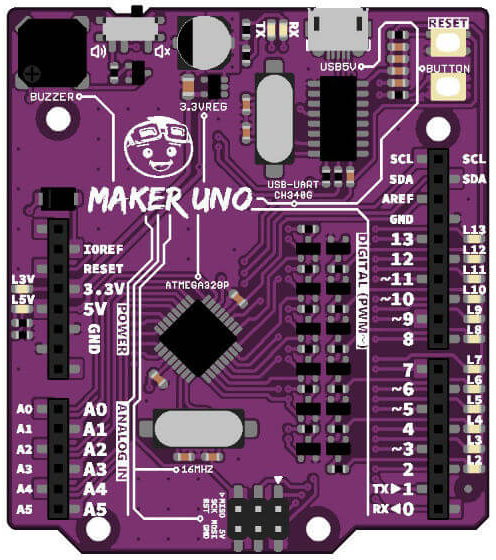
Aside from the standard LED on pin 13, Maker-UNO comes with a programmable LED on every digital pin, from pin D0 to D13. That is a lot of LEDs. How good is that? Now you can learn digital input, output, PWM (piezo buzzer and LED brightness) with just the Maker-UNO board. Not to forget the change of FTDI chip to CH340 IC, the low cost yet stable USB to UART IC.
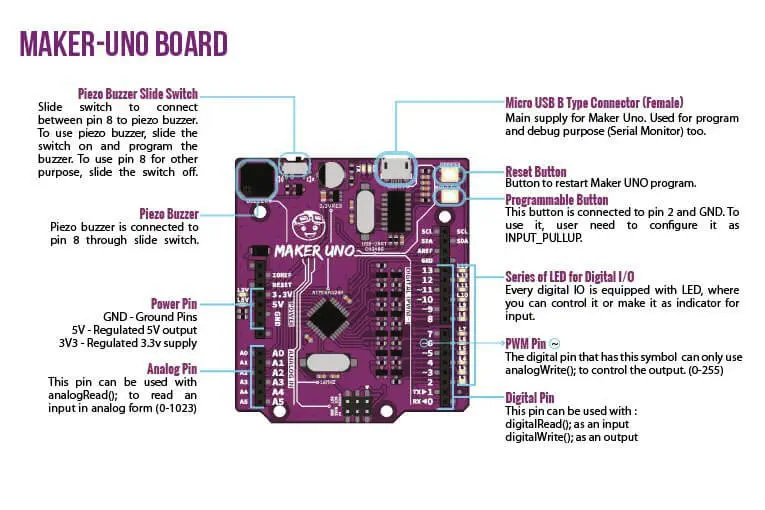
Maker-UNO combines the simplicity of the UNO Optiboot bootloader (which load program faster), the stability of the CH340 and the R3 shield compatibility of the latest Arduino UNO R3.
- 1 x Cytron Maker UNO Microcontroller
- SMD ATmega328P microcontroller (the same microcontroller on Arduino UNO) with Optiboot (UNO) Bootloader
- USB Programming facilitated by the CH340
- Input voltage: USB 5V, from computer, power bank or standard USB adapter
- 500mA (maximum) 3.3V voltage regulator
- 0-5V outputs with 3.3V compatible inputs
- 14 Digital I/O Pins (6 PWM outputs)
- 6 Analog Inputs
- ISP 6-pin Header
- 32KB Flash Memory
- 16MHz Clock Speed
- R3 Shield Compatible
- LED array for 5V, 3.3V, TX, RX and all digital pins
- Utilize USB Micro-B socket
- Purple PCB!